Skip to content
View in the app

A better way to browse. Learn more.

RenoTalk.com ™

A full-screen app on your home screen with push notifications, badges and more.

To install this app on iOS and iPadOS
  1. Tap the Share icon in Safari
  2. Scroll the menu and tap Add to Home Screen.
  3. Tap Add in the top-right corner.
To install this app on Android
  1. Tap the 3-dot menu (⋮) in the top-right corner of the browser.
  2. Tap Add to Home screen or Install app.
  3. Confirm by tapping Install.

Latest Epic Smartphone 5G Digital Lock

Featured Replies

First New launch for Epic Digital lock in 2019 ????

1) Epic 5G digital lock at $450 With 1+2 years warranty

Five Greatest Features

1. Unlock using Bluetooth (keywe app)

2. Unlock using Wi-Fi using bridge at $50

3. 100 fingerprint

4. Up to 100 card, 4 given

5.Password Able to delete individual fingerprint and card

Further Discount if you just need 1 year warranty


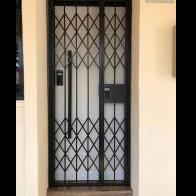
2) Epic 5G digital lock for door and gate at $799

With 1+2 years warranty

Unlock both door and gate using mobile phone or fingerprint ???


3)Epic 5G digital lock with Keywe smartphone push pull lock at $1299,

With Free Wi-Fi bridge worth$99 for this package


Now you can unlock using 4G smartphone with ?????

A) push message

B) Time attendance

C) Invite guest giving temporary access

4) Smart open when you walk close to your digital lock

Less $100 for Any My President Hotel Quality Mattress from $799 onwards with Purchase of Digital Lock https://mypresidentmattress.com/

Free Delivery worth $150,

Deliver within 24 Hours, endorse by most Singapore celebrities

Order Now and get it today 96177025 Leon (24/7) speak English and Mandarin

Call our Mobile Showroom and we will drive to show you today ???

www.digitallock.com.sg

Free Taxi Rebate (Twice the amount) with Any Purchase ??

?:www.digitallock.com.sg

?:11 woodlands close #08-38, woodlans 11

?: 96177025 Leon (24/7)

#HDBDoor #Firerateddoor #laminatedoor #bedroomdoor #maindoor #condodoor #btodoor #veneerdoor #doorfactory #cheapestdoor #hdbgate #mildsteelgate #wroughtirongate #firerateddoor #digitallock #samsungdigitallock #epicdigitallock #keywedigitallock #gatemandigitallock #samsungdr708digitallock #Samsungdr738digitallock #cheapestdigitallock #digitaldoorlock #toiletdoor #koreadigitallock #homeautomation #latestdigitallock #MYDIGITALLOCK #gatedigitallock #pushpulldigitallock #locksmithdigitallock #breakdigitallock #installationservicesdigitallock

53203699_2600845403289891_1101727646217142272_n.jpg

53353381_2590813110959787_7799843128466210816_n.jpg

55638515_2658507444190353_4972603746786738176_n.jpg

56656063_2668622196512211_2024579886059880448_n.jpg

56679271_2674325815941849_3706923605309784064_n.jpg

56764623_2670070563034041_9134491927796776960_n.jpg

Create an account or sign in to comment

Account

Navigation

Search

Search

Configure browser push notifications

Chrome (Android)
  1. Tap the lock icon next to the address bar.
  2. Tap Permissions → Notifications.
  3. Adjust your preference.
Chrome (Desktop)
  1. Click the padlock icon in the address bar.
  2. Select Site settings.
  3. Find Notifications and adjust your preference.