
Skip to content
View in the app

A better way to browse. Learn more.

RenoTalk.com ™

A full-screen app on your home screen with push notifications, badges and more.

To install this app on iOS and iPadOS
  1. Tap the Share icon in Safari
  2. Scroll the menu and tap Add to Home Screen.
  3. Tap Add in the top-right corner.
To install this app on Android
  1. Tap the 3-dot menu (⋮) in the top-right corner of the browser.
  2. Tap Add to Home screen or Install app.
  3. Confirm by tapping Install.

Kevin Lee

Members
  • Joined

  • Last visited

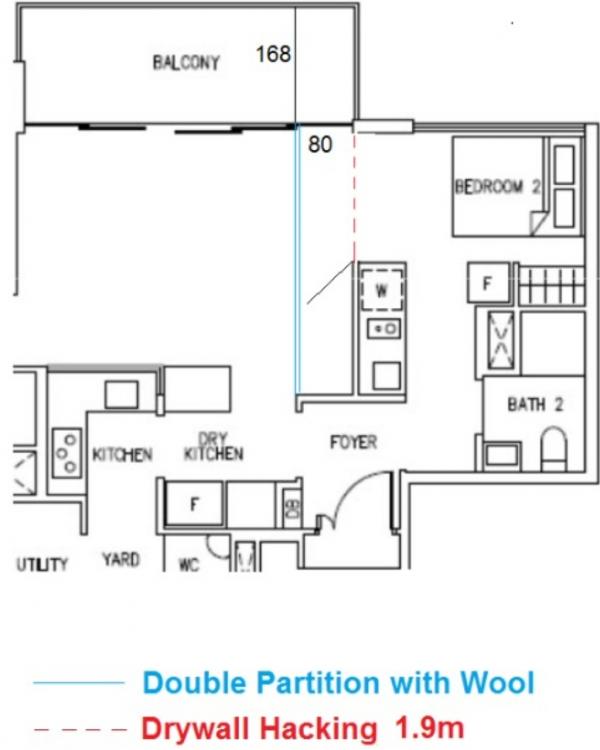
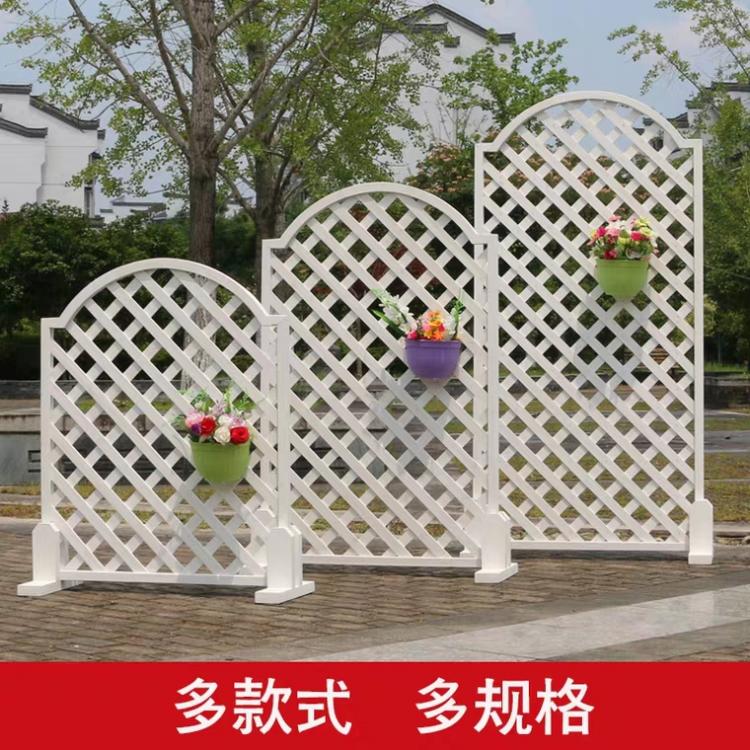
  1. Request for Quotation 1. Hack 1.9m drywall and make good (broken red line) 2. Relocate the electrical points and cable TV to new partition. 3. Erect 4m double sided partition wall panel inclusive of rockwool. (Blue lines) 4. Clear glass swing door 80cm width 5. Paint partitions incl. Sealer paint 6. Dismantle a tv cabinet and clear all debris 7. Weather proof material barrier at balcony 1.68m (like those garden type. See second pic for example) WA me at http://wa.me/6587678374 with your rough quote first. Thanks.
Account

Navigation

Search

Search

Configure browser push notifications

Chrome (Android)
  1. Tap the lock icon next to the address bar.
  2. Tap Permissions → Notifications.
  3. Adjust your preference.
Chrome (Desktop)
  1. Click the padlock icon in the address bar.
  2. Select Site settings.
  3. Find Notifications and adjust your preference.