



petetherock
Members
-
Joined
-
Last visited
-
petetherock replied to leechaorui's topic in Landed & Condo Private Properties Renovation DiscussionDo you need the extra space? Do you have the money or is it better used elsewhere? Is it a forever home, for flipping or meant for rental example?
-
Variable you can discuss with your contractor on what can be achieved after he surveys the condition of your floor and whether you have a concrete plinth
-
petetherock replied to hermes76's topic in Reno t-Blog Chat - Condo Interior Design and Landed RenovationI'm still using my google wifi mesh, added two more recently... happy with what they offer. Will use it until they give up the ghost. I have one at each landing, plus another in my den and one out front to cover the porch / camera ..
-
Changing to a bigger light with a larger diameter is probably the cheapest option
-
If you’re simply asking for a cover, try Amazon or Lazada bought mine from the former
-
petetherock replied to hermes76's topic in Reno t-Blog Chat - Condo Interior Design and Landed RenovationI’m using a basic Google mesh with wired back haul, and it’s been fine.. in case you want something simple… but mount them higher if possible… I use one per floor, located near the stair landing
-
petetherock replied to petetherock's topic in Reno t-Blog Chat - Condo Interior Design and Landed RenovationThis is interesting if anyone wishes to know how much maintenance costs... https://www.tiktok.com/@wilsonbenildusteh/video/7188297188584295682?_r=1&_t=8Z0yhsOkybB
-
Looks great if you can work it into your decor it will serve you well for many more years save money
-
petetherock replied to petetherock's topic in Reno t-Blog Chat - Condo Interior Design and Landed RenovationIts outside, cheers (I think this is the only non spam / ad thread in the past week...)

-
petetherock replied to petetherock's topic in Reno t-Blog Chat - Condo Interior Design and Landed RenovationIt's not that illogical - with time the seals will deteriorate and water seeps in.. the lamps are in a casing and the water doesn't cover the entire lamp. Also it's a 12V system, so you won't get zapped to death.. However, with time those lamps will need replacement, the plastic and the mounts deteriorate in the chlorine... not cheap, but that's all part of the wear and tear running costs of a pool.. That's the old transformer, and the new one: Changed the bulbs too:
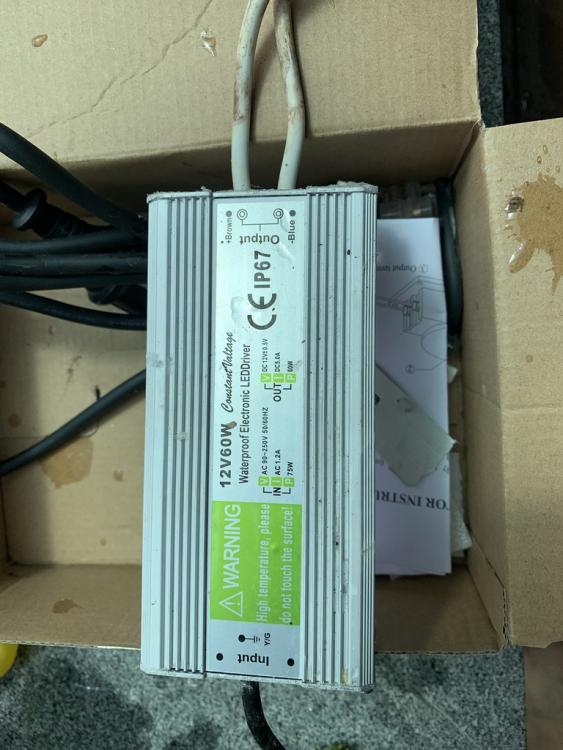
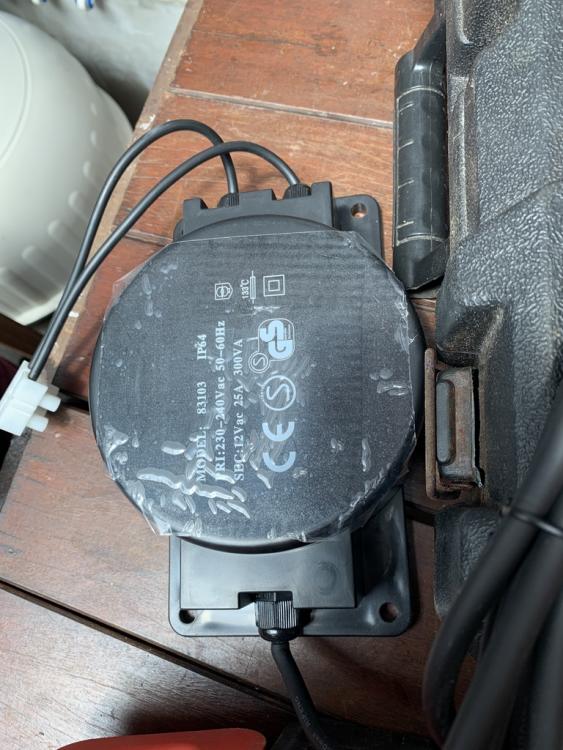

-
petetherock replied to petetherock's topic in Reno t-Blog Chat - Condo Interior Design and Landed RenovationSo recently the lights went out on my pool, I thought it might be the timer, but it turns out that the transformer was kaput.. and one of the bulbs was gone too.. The cables inside the pool had also deteriorated due to the chlorine.. So I had to fix all that, plus change the cover on my DB (which broke) and the bill came up to almost $800... So these are some of the ongoing costs... along with regular maintenance, and chlorine bills... The pool guy suggests using the lights for an hour or more a night to keep the moisture out..
-
petetherock replied to petetherock's topic in Landed & Condo Private Properties Renovation DiscussionHe tested - they are working so maybe as you said - one bulb will find time to get pool guy
-
petetherock replied to petetherock's topic in Landed & Condo Private Properties Renovation DiscussionSo I got an electrician to come by - great guy in case anyone needs one Not the timer or switch sadly, it’s either the cabling within my pool or the lights… might need the pool guy. Will see how since everything else works … sigh
-
petetherock replied to petetherock's topic in Landed & Condo Private Properties Renovation DiscussionThanks 🙏 any electrical store that you can recommend which may sell these items? the DB cover has also broken but can the front of the box be replaced with one of another brand ? I looked - the brand is Marvelin 09.08 and I’m not sure where to source the components….
-
petetherock replied to petetherock's topic in Landed & Condo Private Properties Renovation DiscussionNeed some help: my pool light stopped working - all other circuits are fine, it's on a timer, but even if I turn of the timer, it doesn't work. Everything else on the same circuit are fine So can it be a timer issue or is it the lamps, but can all the lamps fail at the same time? Is there any internal fuse inside the timer - so is it easy to change that module? Or is it the MT 120A module? Thanks very much It's the one labelled L
